Why Manufacturing Facilities Need Industrial Enclosures

Computers, monitors, printers, and other electronics support production tracking, labeling, equipment control, and daily manufacturing tasks. But dust, grease, moisture, and temperature extremes can damage that equipment and interrupt the work it supports.
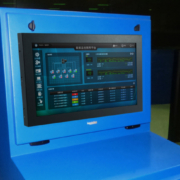
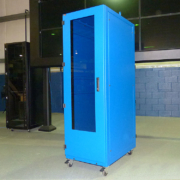
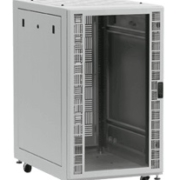
Industrial enclosures for manufacturing help protect sensitive electronics while keeping them accessible on the factory floor. The right solution matches the equipment, operating conditions, and tasks performed at each workstation.
Why Do Manufacturing Electronics Need Added Protection?
Many computers and electronic devices are designed for conditions less demanding than those found on a manufacturing floor. Airborne debris, splashing liquids, and changing temperatures can affect performance and increase the risk of failure.
A properly selected industrial enclosure creates a protective barrier between the equipment and its surroundings. This can help manufacturers:
- Limit exposure to damaging contaminants
- Reduce preventable equipment failures and downtime
- Extend equipment service life
- Position technology close to the work it supports
- Organize equipment and control access
Protection should support daily operations without making equipment difficult to use or maintain.
Common Manufacturing Applications
Different processes expose electronics to different conditions. Enclosure selection should reflect the location and task rather than the industry name alone.
Food and Beverage Production
Production and packaging areas may expose computers and printers to food particles, moisture, washdowns, and cleaning agents. Enclosures must suit the cleaning process while allowing access for tracking, labeling, and other tasks.
Pharmaceutical Manufacturing
Electronics in pharmaceutical processing areas may need protection from moisture and frequent cleaning. Enclosure materials, surfaces, and access points should be evaluated against the conditions and cleaning requirements of the installation.
Hazardous Materials Environments
Where chemicals or corrosive substances are present, material compatibility matters alongside the enclosure rating. Identify the substances and expected exposure before selecting a cabinet. Classified hazardous locations require a separate assessment of applicable equipment and safety requirements.
General Manufacturing
Machining, assembly, and other production areas can expose electronics to dust, grease, debris, and heat. Industrial computer enclosures help protect workstations used for data entry, production monitoring, and equipment operation.
Matching NEMA Ratings to the Environment

A NEMA enclosure type describes a defined level of environmental protection. Common options for manufacturing applications include:
- NEMA 12: For indoor applications requiring protection against circulating dust, dirt, lint, fibers, and dripping or light splashing of non-corrosive liquids.
- NEMA 4: Provides protection against conditions including windblown dust, splashing water, and hose-directed water.
- NEMA 4X: Provides protection similar to NEMA 4, with added corrosion resistance.
Select the rating based on the actual exposure, including cleaning methods and installation location. Material compatibility, cable entry, doors, and thermal management components also need to support the application’s protection requirements.
Managing Temperature Inside the Enclosure
An enclosure can keep contaminants away from electronics, but it also contains equipment that generates heat. Without suitable heat removal, internal temperatures may exceed the equipment manufacturer’s operating limits.
Evaluate the combined equipment heat output, surrounding temperature range, enclosure size, and environmental conditions before choosing thermal management.
Cooling and Heating Options
Depending on the application, options may include:
- Filtered fans: Use filtered surrounding air to remove heat when ambient temperatures and contaminants allow.
- Air conditioners: Provide active cooling when outside air alone cannot maintain the required internal temperature.
- Air-to-air heat exchangers: Transfer heat through separate air circuits when outside air is cooler than the intended enclosure temperature.
- Vortex coolers: Use clean, dry compressed air for enclosure cooling.
- Heaters: Help maintain suitable temperatures in cold conditions.
Complete the Cooling Requirement Worksheet to share your equipment and environmental details with ITSENCLOSURES.
Configuring the Enclosure Around Daily Work
Equipment protection and usability should be planned together. Consider how operators will view screens, enter information, retrieve printed materials, and access equipment for maintenance.
Depending on the model and application, configuration options may include:
- Mounting and mobility: Stands, pedestals, or casters
- Cable entry: Connections arranged to support the required environmental protection
- Equipment access: Lockable doors, panel-mount doors, or printer access doors
- Shelving: Adjustable or sliding shelves
- Input devices: Industrial keyboards and pointing devices
- Rack mounting: Channels for compatible rack-mounted equipment
Confirm available options for the selected enclosure and ensure the arrangement fits the work area.
How Do You Choose an Industrial Enclosure for Manufacturing?
Start with a clear description of the equipment and its intended use. Before selecting a product, gather:
- Equipment details: Types, dimensions, weight, and mounting requirements
- Environmental exposure: Dust, grease, moisture, chemicals, and cleaning methods
- Protection requirements: Appropriate NEMA rating and material compatibility
- Temperature requirements: Equipment heat output and allowable operating range
- Installation details: Available space, mounting location, power, and cable routing
- Operator needs: Screen visibility, equipment access, and daily tasks
Reviewing these details together helps identify a configuration that protects the equipment and supports the people using it.
Protect the Equipment Your Process Depends On
ITSENCLOSURES offers NEMA-rated enclosures for computers, monitors, printers, and other manufacturing electronics, with configuration options based on the equipment and application.
Explore our industrial computer enclosures or contact ITSENCLOSURES for help evaluating protection, thermal management, and installation requirements.
 ITSENCLOSURES, 2022
 Copyright 2023