
Choosing the Right Industrial Enclosure: What to Look For
Computers, monitors, printers, and other electronics need protection from industrial conditions such as dust, water, grease, chemicals, and temperature extremes.
To choose an industrial enclosure, start with the environment and required NEMA rating, then evaluate materials, equipment fit, thermal management, mounting, and operator access. The right combination protects your equipment while supporting the work around it.
This guide walks through eight selection factors and includes a checklist to help you compare options or prepare for a quote.

1. Start With Your Environment
Before comparing enclosure models, identify the conditions your equipment will face.
An enclosure installed on a dusty manufacturing floor may need different protection than one used in a food processing facility with frequent washdowns.
Consider these questions:
- Will the enclosure be installed indoors or outdoors?
- Is the area exposed to dust, dirt, grease, or debris?
- Will water, moisture, or washdowns be present?
- Are chemicals or corrosive materials used nearby?
- What temperatures will the enclosure experience?
- Will the equipment be exposed to impacts or other physical hazards?
Understanding the environment first helps narrow down the level of protection your equipment needs.
For washdown applications, review the NEMA 4X computer enclosure features that can support equipment protection and cleanability.
2. Choose the Right NEMA Rating
A NEMA enclosure type describes a defined level of protection against environmental conditions.
Not every application requires the same protection. Select the rating based on the actual exposure rather than assuming one enclosure type suits every industrial environment.
NEMA 12 Enclosures
NEMA 12 enclosures are designed for indoor use, providing protection against conditions including circulating dust, dirt, lint, fibers, and dripping or light splashing of non-corrosive liquids.
They may be a practical choice for manufacturing facilities where airborne contaminants are a primary concern.
NEMA 4 Enclosures
NEMA 4 enclosures provide protection against conditions including windblown dust, rain, splashing water, and hose-directed water.
They are designed for indoor or outdoor use and may be appropriate for certain wet or washdown applications.
NEMA 4X Enclosures
NEMA 4X enclosures provide protection similar to NEMA 4, with added corrosion resistance.
They are often considered for food, beverage, pharmaceutical, and other processing environments where moisture, washdowns, or corrosive conditions are present.
The rating is only part of the selection process. Confirm that the enclosure material, seals, cable entries, and installed accessories are suitable for the application. NEMA 4X does not establish resistance to every cleaning chemical or washdown process.
3. Select the Right Enclosure Material
The material used to build an enclosure affects its strength, weight, corrosion resistance, and long-term performance.
Three common industrial enclosure materials are mild steel, stainless steel, and non-metallic materials.
Mild Steel
Mild steel is a durable option for many industrial applications.
Powder-coated steel enclosures are commonly used in manufacturing environments where protection from dust, dirt, grease, and other contaminants is needed. The coating provides a protective layer, but damage to the finish can leave the underlying steel vulnerable to corrosion.
Evaluate the expected exposure and maintenance requirements before choosing mild steel for wet or corrosive conditions.
Stainless Steel
Stainless steel provides corrosion resistance and cleanable surfaces, making it useful in environments involving moisture, frequent cleaning, or washdowns.
It may be suitable for food, beverage, pharmaceutical, and other processing facilities.
The specific stainless steel grade should be selected based on the chemicals, cleaning agents, temperatures, and other conditions present.
Non-Metallic Materials
Non-metallic enclosures, including certain fiberglass and polycarbonate designs, may offer lower weight, corrosion resistance, and electrical insulation.
These materials are often used for electrical enclosures and junction boxes. Their suitability depends on the equipment, mounting requirements, temperature, chemical exposure, and other operating conditions.
Compare these options in more detail in our guide to industrial enclosure materials.
4. Determine the Right Enclosure Size
An enclosure needs enough room for the equipment inside it, but equipment dimensions are only the starting point.

Before selecting a size, list everything the enclosure needs to hold. This may include:
- Computers or industrial PCs
- Monitors and touchscreens
- Printers and label printers
- Keyboards and pointing devices
- Power supplies and other electronics
- Cables and connections
- Mounting hardware
- Cooling or heating components
Consider each component’s width, height, and depth, along with clearance for airflow, cable routing, door movement, and maintenance access. Use the enclosure’s usable internal dimensions when checking fit.
An enclosure that is too small can make installation difficult and restrict airflow. One that is much larger than necessary may take up valuable workspace.
The enclosure type also matters. Explore computer enclosures, monitor enclosures, printer enclosures, or rack enclosures based on the equipment you need to protect.
5. Consider Thermal Management
Electronics generate heat during operation. Inside an enclosure, that heat can build up and affect performance.
Thermal management should keep equipment within the manufacturer’s recommended operating conditions. Depending on the application, options may include:
- Filtered fan systems: Use filtered surrounding air to remove heat when ambient temperatures and contaminants allow.
- Air conditioners: Provide active cooling when outside air alone cannot maintain the required internal temperature.
- Air-to-air heat exchangers: Transfer heat through separate air circuits when outside air is cooler than the intended enclosure temperature.
- Vortex coolers: Use clean, dry compressed air for enclosure cooling.
- Heaters: Help maintain suitable temperatures in cold conditions.
The appropriate solution depends on equipment heat output, ambient temperature, enclosure size, contaminants, and the required environmental protection.
Not every enclosure needs active cooling, but thermal management should be considered before equipment is installed.
For more guidance, read about enclosure filter fans or configuring a temperature controlled rack enclosure. You can also complete the Cooling Requirement Worksheet to share your application details with ITSENCLOSURES.
6. Plan the Mounting and Installation
Where and how an enclosure will be installed affects which configuration will work best.
Some applications require a stationary workstation. Others benefit from a mobile enclosure that can move between work areas.
Depending on the product, installation options may include:
- Freestanding enclosures
- Wall-mounted enclosures
- Pedestal-mounted workstations
- Mobile configurations with casters
- Bolt-down stands or legs
Consider available floor or wall space, equipment weight, operator access, and nearby machinery. Allow room for doors to open and for technicians to reach service points.
For wall-mounted or elevated installations, the mounting hardware and supporting structure must be suitable for the total installed weight of the enclosure, equipment, and accessories.
Plan power and data connections at this stage as well. Cable entry methods must support the environmental protection required for the application.
7. Configure Equipment Access and Daily Use
An enclosure should protect electronics without making them difficult to use.
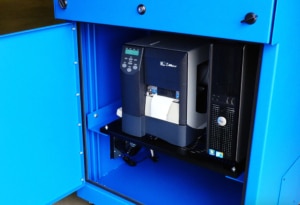
Think about how operators will interact with the equipment throughout the day. Will they need to use a keyboard or touchscreen, retrieve printed labels, or connect peripheral devices? How will technicians access equipment for maintenance?
Depending on the model, options may include:
- Lockable doors
- Viewing windows
- Panel-mount monitor doors
- Keyboard trays and drawers
- Adjustable or sliding shelves
- Hinged printer access doors
- Cable entry and management options
- Industrial keyboards and pointing devices
Confirm compatibility with the specific equipment being installed. Screen position, keyboard height, printer access, and door clearance should suit the people and tasks at the workstation.
8. Plan for Future Equipment Changes
Industrial technology changes over time. A computer may be replaced, a monitor may get larger, or a printer may need to be upgraded.
Consider whether the enclosure offers:
- Space for reasonable equipment changes
- Adjustable shelves or mounting options
- Access for removing and replacing components
- Room for additional cables and connections
- Thermal management capacity for planned additions
You don’t need to accommodate every possible upgrade. Some flexibility can help avoid replacing an otherwise reliable enclosure when equipment changes.
Recheck equipment fit and cooling requirements whenever components are added or replaced. Extra space alone does not guarantee that the existing thermal management system can handle a higher heat load.
Industrial Enclosure Selection Checklist
Gather these details before comparing models or requesting a quote:
| Selection Factor | Information to Gather |
| Environment | Indoor or outdoor location; dust, water, grease, chemicals, and other exposure |
| NEMA rating | Required level of environmental protection |
| Material | Compatibility with moisture, cleaning agents, corrosion, and operating temperatures |
| Size | Equipment dimensions and clearance for cables, mounting, airflow, and maintenance |
| Thermal management | Equipment heat output, allowable operating limits, and ambient temperature range |
| Installation | Available space, mounting method, structural support, power, and data connections |
| Access | Operator tasks, screen visibility, input devices, printer access, and maintenance needs |
| Future needs | Planned equipment additions or replacements and their effect on space and heat load |
These details provide a useful starting point for evaluating enclosure options. If some information is unavailable, identify what still needs to be confirmed.
Find the Right Protection for Your Equipment
The right industrial enclosure depends on your equipment, environment, and application. You don’t need to know every specification before asking for help.
ITSENCLOSURES offers NEMA-rated industrial enclosures with configurable options for computers, monitors, printers, and other electronics.
Explore our industrial computer enclosures or contact ITSENCLOSURES for help selecting the right enclosure, NEMA rating, material, and configuration for your application.
 Copyright 2023